

The Warebid blog
Used Server Racks in Singapore: Will Your Equipment Actually Fit?
A low price means little if your server rails, cables or UPS do not fit. Check a used rack’s usable dimensions, mounting hardware and full setup cost before buying.
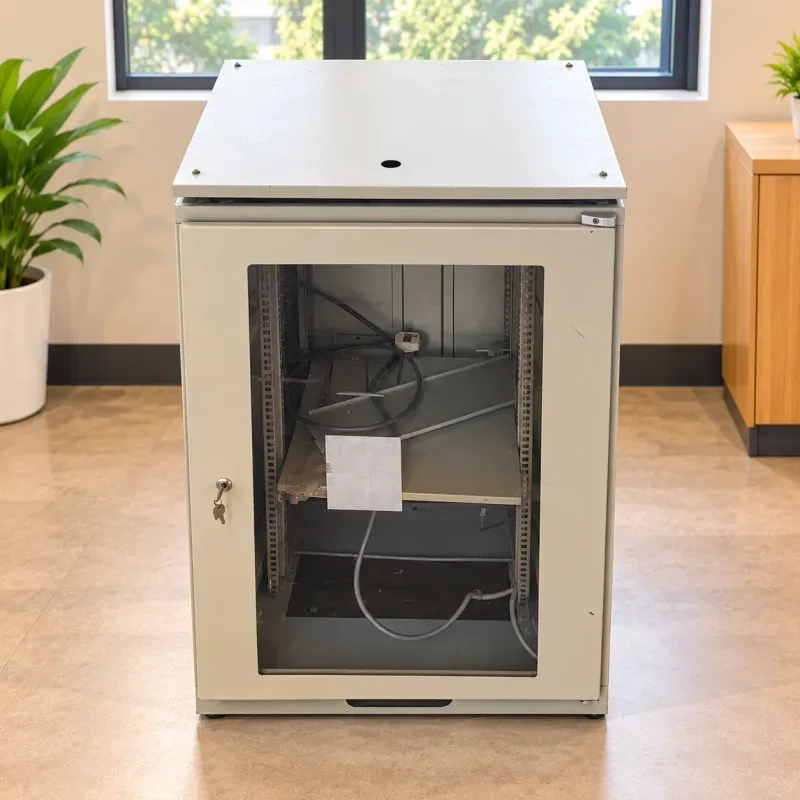
A used server rack is worth considering when its mounting dimensions, support hardware and documented load capacity match your equipment. Check the usable space inside, not just the cabinet’s outside measurements. Include cable clearance, ventilation, missing accessories and delivery in the comparison before deciding that a cheaper rack is better value.
For a small office network or home lab, the expensive mistake is discovering a mismatch after collection. When comparing a server rack in Singapore, start with a list of the exact devices and accessories you plan to install, including any UPS battery backup, shelves and power distribution unit (PDU).
Four measurements that answer different questions
| Measurement | What it tells you | What to verify |
|---|---|---|
| Usable height in U | Vertical mounting capacity | Equipment plus shelves, patch panels and planned expansion |
| Mounting format and width | Whether equipment and fixings align | Actual mounting standard, hole type and compatible hardware |
| Front-to-rear mounting depth | Whether rails or four-post shelves can attach | Their adjustment range against the cabinet’s rail positions |
| Clearance behind and in front | Space beyond the installed equipment | Connectors, cable bends, door closure and service access |
One rack unit, or 1U, is 44.45 mm of vertical mounting space; it is not the cabinet’s overall height. StarTech’s rack guidance explains this distinction. Likewise, a 19-inch mounting format does not mean the outer cabinet is 19 inches wide. A taller cabinet can still be too shallow for a server. Ask for photographs showing measurements on the actual unit.
Match the support to the device
Read the device and rail-kit requirements together. A pair of front mounting ears does not establish that a heavy device can hang from them alone. Check whether it needs front and rear support, its original sliding rails or a suitable shelf. For equipment without rack brackets, confirm the shelf’s usable width, depth and own load limit. A cabinet’s total rating does not establish what an individual shelf can support.
A practical inspection before collection
- Ask for the rack’s make, model and load documentation, if available. Distinguish its stationary rating from any rating for moving it on castors; do not infer either from its appearance.
- Inspect the frame, mounting posts and fixings for bending, significant corrosion, missing bolts and improvised repairs. Confirm adjustable posts can be positioned and secured where your equipment needs them.
- Check the mounting-hole type against your rails and fasteners. Ask exactly which shelves, cage nuts, screws, cable managers, side panels and keys are included; objects visible in a photograph are not automatically part of the sale.
- Open the doors and removable panels. Test locks and hinges, and check that proposed cables or rear-mounted accessories will not prevent the doors closing.
- Measure the collection and delivery route, including lift openings, corners and thresholds. Agree who will unload, move and position the cabinet, and whether it must travel empty.
A glass door is not a cooling specification
Consider where each device draws in and exhausts air. Eaton’s buying guide highlights mounting depth, PDU placement, weight and cooling as connected decisions. An enclosed network cabinet suited to a switch and patch panels may not suit deeper, hotter server equipment. Check the intended equipment’s requirements against the enclosure’s actual ventilation arrangement.
Fans, power strips or cables found inside a used cabinet need separate inspection. Their presence does not establish working condition, capacity or electrical suitability. Ask a competent installer to verify the setup where necessary. Also think about everyday use: can you reach a failed power supply, unplug a cable and remove equipment without moving the entire cabinet?
Compare the complete setup cost
Use this comparison: purchase price + transport and handling + missing rails or shelves + necessary repairs or installation. Ask for itemised costs before reserving. A cheap cabinet that needs hard-to-find hardware can be less useful than a complete alternative that already fits your equipment.
Warebid’s light grey glass-door network cabinet illustrates the checks: its listing describes mounting rails, a lock and key, top cable entry and a lower ventilation opening. Those features do not establish its U capacity, mounting depth, load rating or suitability for your server. Confirm those details and the condition of the individual unit.
Choose used when compatibility and condition are clear and the complete cost makes sense. Consider another unit when essential dimensions or support requirements remain unresolved. Browse current Warebid listings for available options; availability and inclusions must be confirmed for each item.
Questions buyers often ask
Will every 19-inch server fit a 19-inch rack?
No. The mounting format is only one requirement. Equipment depth, rail compatibility, support, load capacity and clearance still need to match.
Does a network cabinet include servers or a UPS?
Only if the quotation explicitly includes them. Confirm the cabinet, accessories and any electrical equipment separately.
What should I send when asking about a used rack?
Send device model numbers, U requirements, depth, weight, rail details and a delivery address with access information. This makes a useful fit check possible.
Have your equipment list ready? Email [email protected] with the listing you are considering and the measurements you need confirmed before arranging collection or delivery.
 WhatsApp channel
 Telegram channel